
GMulti Manual
Welcome to GMulti
GMulti is a three-band compressor with stereo enhancement and advanced visual feedback.
The input signal is split at user-defined frequencies into three bands. Each of these bands can be compressed independently and have its stereo width altered before being mixed back together.
Installation
- All GVST plug-ins come compressed in a ZIP file, so the first step is to extract the files from the ZIP file.
- Once extracted, you should have one or more DLL files, these are the plug-in files.
- You need to copy the plug-in files to the appropriate folder for your host program.
- In most cases, you will need either to restart the host program or re-scan the plug-in folder in order for newly-installed plug-ins to appear.
Hints
- Bass frequencies are not directional, so it is usually preferable to share these powerful frequencies between speakers. (Some speaker systems take advantage of this fact by taking the bass load from the signal and sending it through a single, purpose-built 'sub' speaker). You can use the width control to 'collapse' the stereo image of the bass band so that it is centred.
- You can use the mute switches listen to bands individually or in any combination. This can be a great help when configuring the compression for each band.
Interface
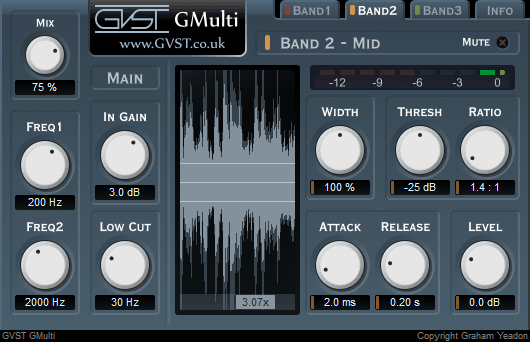
Each knob is laid out the same way for consistent and easy reference. Above each one, its function is labelled. Below each is a numerical readout of its value. There is also a waveform display and a gain reduction meter for each band.
Gain: This knob adjusts the gain applied to the signal before it enters the compression stage.
Low Cut: Configure the high-pass filter. Anything below this frequency is cut. Turning the dial down to the minimum will disable the high-pass filter.
Freq 1 and Freq 2: The cross-over frequencies. The first band is defined as anything up to Freq 1. The second band is defined as anything between Freq 1 and Freq 2. And the third band is defined as anything above Freq 2.
Thresh: The compressor threshold. If the level for a band rises above its threshold, compression will be applied.
Ratio: The amount of compression to apply. The level of a band will be reduced according to this ratio whenever it exceeds the relevant threshold.
Attack: The speed at which compression will take effect after the signal level rises above the threshold.
Release: The speed at which compression will relax when the signal level drops.
Width: The amount that the stereo image is accentuated.
Level: Post-compression level adjustment for each band.
M: The switches labelled M are mute switches. When engaged, the associated band will be silent.
Mix: This controls the mix between the original and processed audio. At 0% the output is entirely unprocessed and at 100% the output is entirely processed.
Waveform Display and Gain-Reduction Meters: The amount of compression is displayed visually in two ways. The waveform display shows a before and after trace of the waveform. This display can show any band and can be zoomed in or out. There is also a gain-reduction meter for each band that shows how much the signal level is being reduced. The meters have a resolution of 1dB per bar.
License
- GVST plug-ins are provided to the user at no cost. While every GVST plug-in is tested to the best of the developer's ability, no warranty or guarantee is offered to the end user.
- No suggestions made by the developer or his representatives (i.e., freely offered support) are to be taken as an implied warranty or guarantee.
- These plug-ins may only be distributed by the official GVST website, or by parties explicitly given permission by the developer.
- GVST plug-ins are to be distributed only in their original form as intended by the developer (i.e., the unaltered archive).
- GVST plug-ins are freeware, meaning you are never under any obligation to pay for them! However, should you wish to help support continued development of GVST software, please consider donating through the official website.
Credits
- Development, code, website and graphics by Graham Yeadon.
- Documentation by Greg Pettit and Graham Yeadon (many thanks to Greg for all of his help).
- VST technology copyright Steinberg GmbH.
- The "VST" name and logo are registered trademarks of Steinberg GmbH.
- "Windows" is a registered trademark of Microsoft Corporation.
- "Mac" and "OSX" are trademarks of Apple Inc.